Sales this month
2.1K↘ -98% vs Sep (97.2K)

INVENTORY. ORDERS. ACCOUNTING. CONNECTED.
Purchasing, inventory, sales, accounting, Optional CRM and HR & Payroll add-ons. Built for trading, retail and growing teams.
14 days free · No credit card required
SEE THE WORK MOVE
A guided simulation based on your real Tadaro screens. Watch the sequence or choose a step and try it yourself.
| Product | Quantity | Unit price | Amount |
|---|---|---|---|
| Fresh tomatoes · kg |
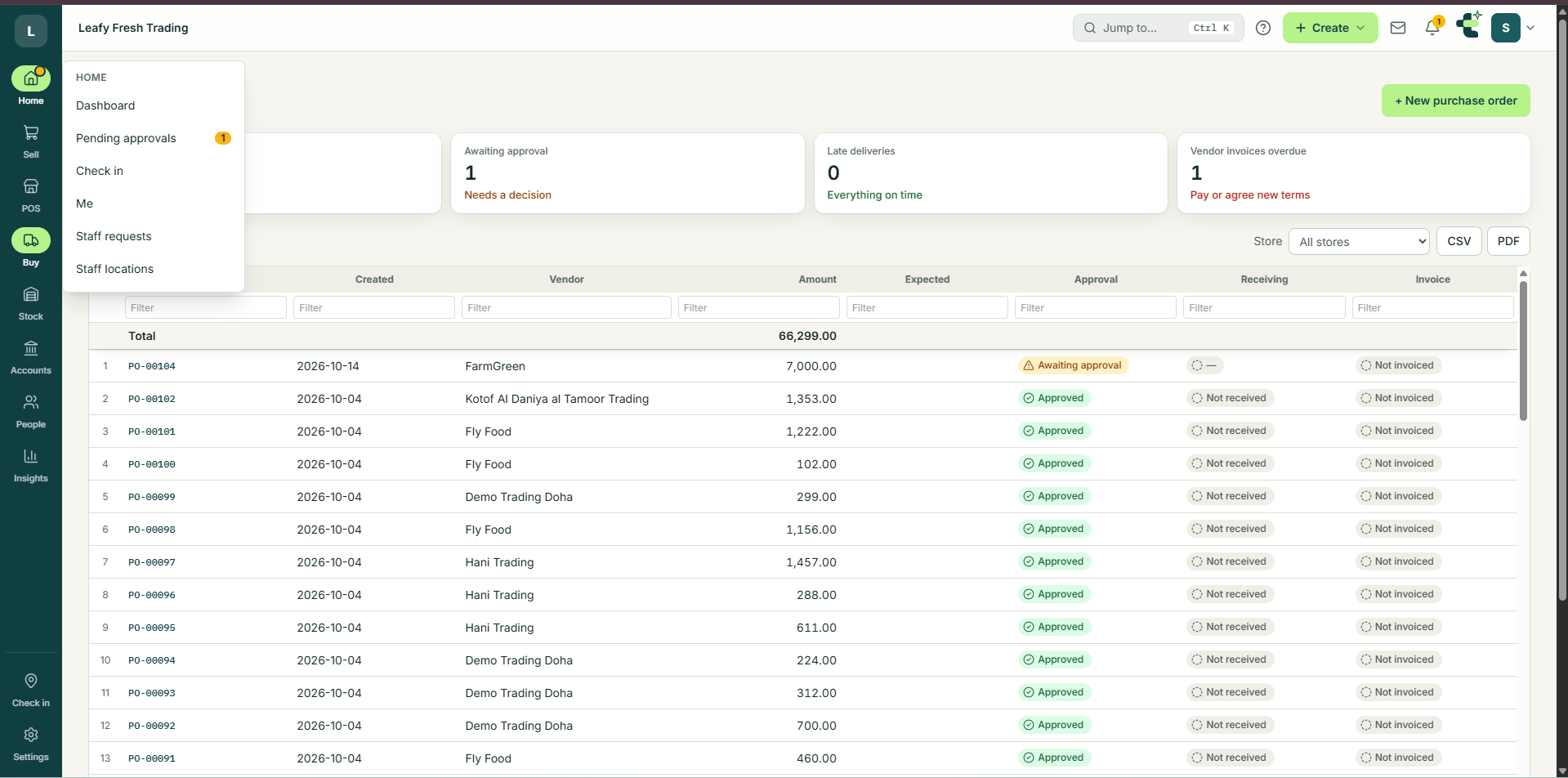
Captured app screens supplied for this showcase. Their historical figures are separate from the simulated workflow above.
 Open the image to see it at full size.
Set up your company and try your own workflow. 14 days free, no card required.
A CLEAR START TO YOUR DAY
Know what you can sell, what needs to leave the warehouse and which payments need attention.
↘ -98% vs Sep (97.2K)
△ Behind pace · 150K target
↘ -100% vs Sep (105.8K)
Nothing to decide
Approved sales orders per month, QAR
| Month | Sales · QAR | Target · QAR |
|---|
Posted purchase invoices per month, QAR
| Month | Purchases · QAR |
|---|
There are no pending approvals in this sample workspace.
No live approval records have been read or changed.You have not checked in to this demo session.
Preview only. No attendance record or location is saved.9 sample products
Nothing short
Short now, on order
Order soon
| # | Product | Unit | In stock | Committed | Available | Expected | Main Warehouse | In transit | Stock level | Value |
|---|---|---|---|---|---|---|---|---|---|---|
| Visible sample total · QAR | ||||||||||
Showing a subset of the reference screen. Scroll the table to see all columns; select a product for sample details.
DESIGN PREVIEW · Sample figures based on your reference. Charts use illustrative monthly values, not live account data.
Sample figures only. Actions here do not change your ERP records.
MEET YOUR NEW WORKSPACE
Find the stock. Follow the order. Understand the numbers. Explore how your daily work comes together in Tadaro.
INSIDE TADARO / STOCK AVAILABILITY
Know what is available.See stock, commitments and expected quantities together.
Spot what needs attention.Find products that are below their reorder point.
Keep the detail in view.Compare warehouse quantities, stock levels and item values.
Stock, suppliers and purchase orders — connected in one workspace.
POINT OF SALE
Keep your counter moving with a clear product catalog, stock at a glance and a focused checkout. Take a closer look at Tadaro POS, then try a sample sale below.
INSIDE TADARO / POINT OF SALE
01 Find the right productSearch the catalog or browse categories. See the price and available stock together.
02 Keep the sale in viewProducts on the left. Your customer, basket and total on the right.
03 A focused checkoutCash and card options, the selling location and today’s sales in one workspace.
Walk-in customer Sample sale
Sample prices in QAR. No taxes or fees applied.
Interactive sample checkout · No payment is collected and no inventory or accounting records are changed.
SMALL STEPS. A STRONG START.
Try the journey before you sign in. Choose your business details, review a sample import and see your invoice come together.
This walkthrough stays in this browser tab. Nothing is uploaded, sent or saved to your live account.
STEP 02 / BRING THE BASICS
See how an import review could catch a duplicate before it enters your catalog.
2 valid items · 1 duplicate SKU excluded. These are preset sample rows, not an uploaded file.
A FIRST STEP WORTH TAKING
Bill to
Created for this walkthrough only. Nothing was sent, posted to accounts or deducted from stock.
Go to your Tadaro workspace ↗MOVING FROM EXCEL?
Organize the basics with these CSV starter templates. Open them in Excel and replace the example rows with your own information.
Preparation templates only. Live import support and field mapping need to be confirmed in your ERP workspace.START WITH THE WORK YOU DO
Explore a familiar task first. Bring the rest of your operations into view as you grow.
Explore a simple basket, change quantities and complete a sample sale.
Try the POS demo ↗02 / TRADING COMPANIESFollow customers and sales orders in a shared view for your team.
Explore sales ↗03 / DISTRIBUTORSExplore item quantities and locations before the next order goes out.
Explore inventory ↗THE WORK BETWEEN THE DEPARTMENTS
Follow a simple example from a customer request to the records your finance team needs.
ILLUSTRATIVE WORKFLOWNorthline Supply orders 40 packing cartons. Keep the customer, items and order details together.

PEOPLE FIRST. EVERYTHING CONNECTED.
Your business is more than a collection of departments. Tadaro brings the work together, so your team can focus on what comes next.
Bring operational and financial workflows into a shared ERP.
Keep approvals and access part of the way your team works.
Connect your own AI provider key and explore journal and ledger insights.
CRM · FROM FIRST CONTACT TO CUSTOMER
Bring leads, customer contacts and sales follow-ups into the same workspace as your orders.
HR · YOUR PEOPLE, ORGANISED
Keep employee records, contracts and important documents together, with access based on each person's role.
Create your account, set up your company and invite your team.
Start free trial →ONE WORKSPACE. ROOM TO GROW.
Try core ERP and add-ons with up to 5 active users during the trial. Bring your sales, stock, customers and people together before choosing the plan that fits.
No card needed. Core ERP on every plan. CRM, HR & Payroll and AI Audit are optional add-ons.
For a small team getting off spreadsheets.
$19 USD / month
or $190 USD / year
3 users included
For a growing company that buys and sells every day.
$39 USD / month
or $390 USD / year
10 users included
For larger teams, with more users as you need them.
$79 USD / month
or $790 USD / year
25 users included
Additional users: $3/month or $30/year each.
Prices are per company in USD, excluding applicable tax. Payments are handled by Paddle, our reseller. Full pricing details · Terms · Refund policy
Need a hand getting started? support@tadaro.app
A LITTLE MORE CLARITY
Get to know the platform before stepping into your workspace.
Create an account, then your company workspace. Explore Tadaro free for 14 days, with no credit card required to start. See pricing and plan details before choosing a subscription.
No. Try the simulated workflow on this page first, then start with the items and customer details needed for your first task. Check your company settings before creating real business documents.
Email support@tadaro.app with your question. You can also explore the sample workflow without creating an account.
Tadaro brings inventory, purchasing, sales, customers and accounting into a shared ERP, with approval workflows, CRM, HR and an AI assistant.
Yes. Switch the platform tabs, search the sample records and follow the order workflow. These are interactive examples. Start a free trial to create your own workspace, or log in if you already have an account.
Yes. Add products to the POS basket, change quantities and complete a sample sale. This is a checkout design preview; it does not take payments or update your ERP records.
The assistant can help explore business information and prepare supported actions. Review proposed changes before approving them. Available actions depend on your role and company configuration.
Start with one everyday workflow. Review your items, customer and supplier records, and team access with your app operator before bringing the rest of your operations into the workspace.
YOUR NEXT CHAPTER STARTS HERE